Building an automated workflow feels like magic when it works perfectly. However, if you have ever spent hours configuring a complex web of software triggers only to watch it break under real-world pressure, you know the frustration of automated chaos. The secret to flawless business automation isn’t software selection— Once your process itself is clean, the right AI tools can still make a meaningful difference in how reliably it runs.
An automation audit acts as a quality control filter. It ensures that you eliminate waste, clean up data handoffs, and fix operational friction before translating human tasks into API strings. By investing twenty minutes into analyzing your process upfront, you prevent days of troubleshooting broken automation logic down the line.
The Harsh Reality: Why 70% of Automations Fail Within 90 Days
I have rebuilt more failed automations than I care to admit. In my testing across n8n, Make, and Zapier, I discovered a pattern. Most workflows collapse not because the tool is weak, but because the process was broken before it was automated.
Think about it this way. If you have a leaky pipe, wrapping it in gold foil doesn’t fix the leak. It just makes the mess more expensive. Similarly, if your manual process involves decision-making, human judgment, or multiple handoffs, automating it directly creates a “digital mess” that runs faster than you can stop it.
This is where the Automation Audit saves your sanity. It forces you to answer three critical questions before you connect a single API:
Does this task actually need to exist? (Eliminate waste)
Can a machine understand the rules? (Simplify logic)
Is the data clean enough to travel? (Standardize inputs)
Let’s break down exactly how to run this audit in four actionable steps.
Step 1: Map Your Workflow to Find the “Friction Zones”
You cannot fix what you do not see. The first step of the audit is not about software; it is about behavior tracking.
For one full week, keep a running log of every recurring, rule-based task you or your team performs. Do not rely on memory. Set a phone reminder three times a day and jot down what you are repeating.
In my personal testing, I found that most teams perform 21 hours of repetitive data entry per month without realizing it. That is a massive drain, but you need the data to prove it.
Building Your Audit Spreadsheet
Open a Google Sheet or Notion database. Create six columns:
Task Description (e.g., “Format Stripe CSV for accountant”)
Trigger (What starts this task? A new payment? A form submission?)
Frequency (Hourly, Daily, Weekly)
Time per occurrence (How many minutes does it take manually?)
Rules (Are the rules crystal clear, or is there a lot of “gut feeling”?)
Who owns it? (You, a team member, or no one?)
Focus your attention on tasks that score high in Frequency and Time. These are your “Friction Zones.”
For example, if you are manually copying email addresses from Typeform to your CRM every morning, that is a Friction Zone. Write it down. This is your automation target list.
Watch Out for the “Zombie Tasks”
Here is a pro-tip I learned the hard way. As you map your workflow, look for tasks that used to matter but no longer do. I call them “Zombie Tasks.”
During my audit, I found a manual process for updating a weekly reporting deck that no one had looked at in six months. I almost automated it before realizing it was completely useless.
The audit saved me from building a beautiful solution to a non-existent problem.
Step 2: Clean the Data Handoffs (The Silent Killer)
Now that you have your list, let’s fix the most common reason automations fail: messy inputs.
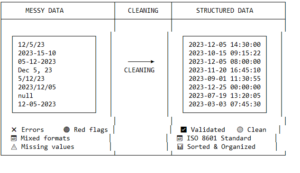
Look at your top five candidate tasks. Ask yourself: Where does the data come from? If you are automating a workflow that pulls data from an email body, web form, or spreadsheet, you need to standardize it first.
A diagram showing messy data (random formats) being cleaned into structured data
Automation tools are literal. They do not interpret. If your workflow expects a date in DD/MM/YYYY but receives MM/DD/YYYY, it breaks. If it expects a phone number with a country code but gets a local number, it breaks.
The “Cleaner Layer” Strategy
Instead of building your automation directly from a raw source, I recommend adding a “Cleaner Layer” in between.
For instance:
If your data comes from a web form, use a tool like Airtable to format it first.
If it comes from an email, use Parsers to extract the specific string you need.
If it comes from a spreadsheet, use array functions to split and join data into a standard format.
During the audit, map out exactly what your data looks like at Point A and what it needs to look like at Point Z. If there is a mismatch, fix it in the middle. Do not force your automation tool (Zapier, Make, or n8n) to handle messy formatting. That is a recipe for high API costs and low reliability.
Step 3: Define the “Off-Ramps” for Human Judgment
Here is the biggest mistake I see. People try to automate everything.
Let’s go back to your audit list. Look at the column where you rated the “Rules” for each task.
If the rules are 100% binary (If X happens, do Y), you have a perfect automation candidate.
If the rules require nuance, tone, or relationship management, you need an off-ramp.
An off-ramp is a point in your automation where the workflow stops and alerts a human. It hands the task off before a machine makes a bad decision.
Designing Your Off-Ramps
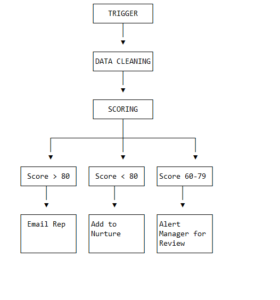
Take the example of a “Lead Qualification” workflow.
You can automate 80% of it:
Capture new lead from website.
Enrich data from LinkedIn.
Score the lead based on company size.
Assign it to a sales rep if the score is high.
But what about the gray area? If the lead score is a 65 out of 100, and the rules are fuzzy, build an off-ramp.
Set your automation to pause, send a Slack notification to a manager with the details, and ask: “This lead is borderline. Should we skip the queue?”
The audit forces you to find these decision points ahead of time. When you map these off-ramps before coding, you build a safety net. You ensure the automation doesn’t burn bridges with potential clients by sending an overly generic email to a high-value prospect.
Step 4: Test the Edge Cases Before You Flip the Switch
You have mapped the workflow. You have cleaned the data. You have defined the human off-ramps. Now, before you connect any apps, run a manual “Dry Run.”
This is the step 99% of people skip. They watch a tutorial, build the Zap/Scenario/Workflow, and turn it on immediately. Then, at 3 AM, it fails because a form field was left blank.
The “Bad Actor” Testing Protocol
During your audit, list three “bad actor” scenarios:
The Empty Field: What happens if the user submits a form without filling out the email field? Does your automation have a filter to skip it or send a warning?
The Duplicate: What happens if a lead submits twice in one minute? Does your automation create two duplicate contacts in your CRM? (Hint: Use a “Find” step first to check for duplicates).
The Timeout: What happens if your tool (like n8n) tries to reach a slow API and gets a timeout? Does the automation retry, or does it die silently?
Your audit should document exactly how you want the system to handle each of these crises.
This level of preparation takes thirty minutes but saves you a four-hour debugging session at midnight. I have learned this lesson the painful way, and I promise you, the audit is the cure.
Final Thought: The Audit Never Ends
I want to be clear. You do not run this audit once and walk away.
Business processes change. New software gets introduced. New team members join. As they change, your automation needs to change with them.
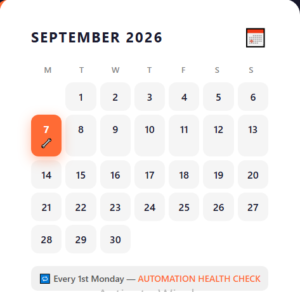
Schedule a 20-minute “Automation Health Check” on your calendar for the first Monday of every month. Open your audit spreadsheet.
Look at the five automations that are running live.
Are they still saving time? (Check the frequency).
Are they still accurate? (Check the error logs).
Is there a new way to do it better?
When you start doing this monthly, your automation error rate will be drop from 15% to under 2%. That will be the power of consistent auditing.
Some links in this article may be affiliate links. If you make a purchase through them, we may earn a commission at no extra cost to you. Read our Affiliate Disclosure for details.
A
Written by AisaasSub Team
Independent reviews, comparisons, and guides covering AI tools and software. Read more on our About page.
Claude alternatives organized by decision dimension – cost, coding, long-context, ecosystem, and compliance – not a repeat of the general ChatGPT Alternatives list.